Category: database


expr BETWEEN min AND max

If expr is greater than or equal to min and expr is less than or equal to maxBETWEEN returns 1, otherwise it returns 0. This is equivalent to the expression (min <= expr AND expr <= max)

https://dev.mysql.com/doc/refman/8.0/en/comparison-operators.html

一句话: MYSQL BETWEEN 是包含 Min 和 Max值的

先说结论, 默认的单精度float 类型,如果没有指定超过24的精度(超过24就是double类型了),那么它的数据位数精度是2^24, 它包含小数点后边的整体有效数字不能超过16777216,不管小数点在哪个位置

比如1.2345678 123.45678 1234.5678 1234567.8 都可以精确表达(如果你设置的float(M,D)精确符合你的数字的话, 不然会被截断或者近似的表示)

当数值超过16777216,比如123456789则会出现各种奇怪的现象(尾数会不精确)

===========================================================

从官方文档可以知道, float使用4 byte 来实现,8 * 4 = 32位

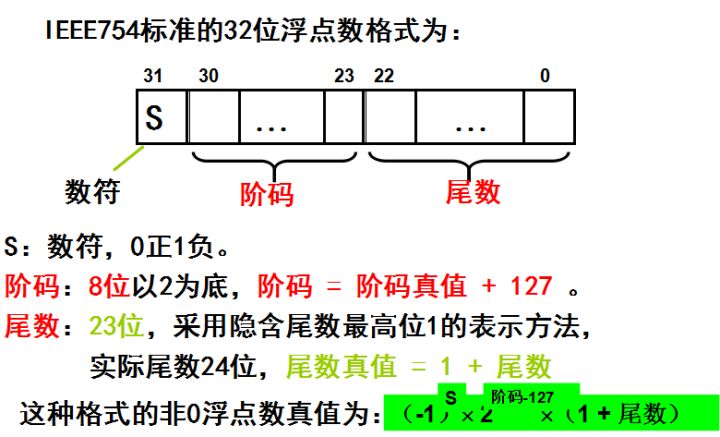
根据IEEE754标准, float 会使用科学计数法, 而底数部分 有24位来存储(其中最高位1被隐含了)

https://www.zhihu.com/question/21711083

以下是相关的追踪过程:

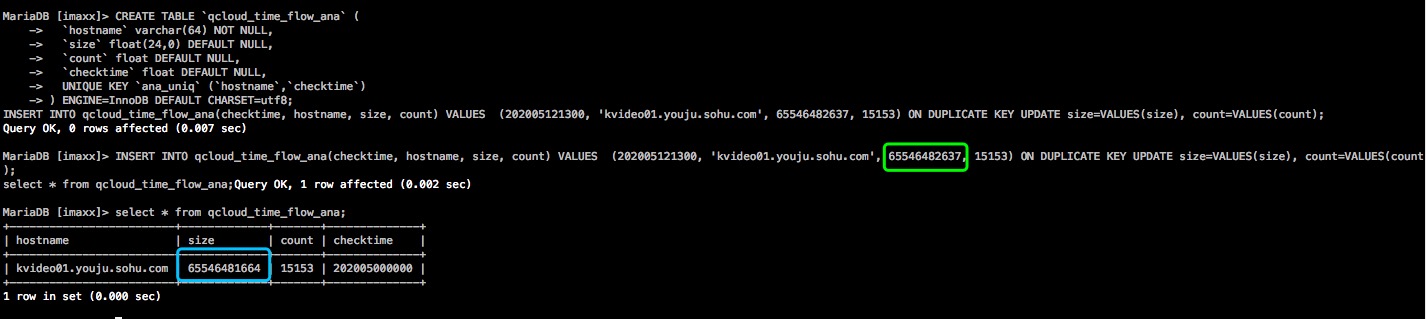
最近发现float存在精确性的问题,比如我insert 一个比较大数据值进去

出来的结果和预期会有精确性的差异, 搜了下文档有提到:

对于单精度浮点数Float:  当数据范围在±131072(65536×2)以内的时候,float数据精度是正确的,但是超出这个范围的数据就不稳定,没有发现有相关的参数设置建议:将float改成double或者decimal,两者的差别是double是浮点计算,decimal是定点计算,会得到更精确的数据。

来自 https://www.cnblogs.com/shamo89/p/8202837.html

另外有文档提到,float的整数部分不能超过7位,超过7位后则是不精确的结果,原因暂时未知

不能超过7位数的, 这个说法其实也是基于2^24 = 16777216(8位数)的一个经验性的判断说法而已

https://segmentfault.com/a/1190000016476936

而官方文档并没有特别详细的介绍这一点https://dev.mysql.com/doc/refman/8.0/en/floating-point-types.html

ERROR 122 (HY000): PM1 : Bulkload Read (thread 0) Failed for Table cdn. Terminating this job.

#perror 122
OS error code 122: Disk quota exceeded
MySQL error code 122: Internal (unspecified) error in handler

内部错误,没有特别好处理的办法,查了下,有日本文档介绍通过取消batchinsert设置来定位问题的,不过我测试失败
调试过程中发现取消了infinidb_use_import_for_batchinsert则可以正常导入,另外通过笨办法分割导入定位到了出错数据,原来是原始数据的某一列中包含了”\r\n”的内容,而我的导入方式是以\n 作为结尾的

附上日本文档地址和方法:
mysql> SELECT @@infinidb_use_import_for_batchinsert; — これがONだとLOAD DATA INFILEを/usr/local/Calpont/bin/cpimportにマップしてくれるので無効にする。
+—————————————+
| @@infinidb_use_import_for_batchinsert |
+—————————————+
| 1 |
+—————————————+
1 row in set (0.00 sec)

mysql> SET SESSION infinidb_use_import_for_batchinsert= 0;
Query OK, 0 rows affected (0.00 sec)

mysql> LOAD DATA INFILE ‘/data/tmp/fifo’ INTO TABLE vegelog;
Query OK, 17208325 rows affected, 2076 warnings (5 min 35.09 sec)
Records: 17208325 Deleted: 0 Skipped: 0 Warnings: 2050

mysql> show warnings;
+———+——+——————————————————————————–+
| Level | Code | Message |
+———+——+——————————————————————————–+
| Warning | 1262 | Row 5397 was truncated; it contained more data than there were input columns |
| Warning | 1262 | Row 5406 was truncated; it contained more data than there were input columns |
| Warning | 1262 | Row 59575 was truncated; it contained more data than there were input columns |
..
| Warning | 1261 | Row 329176 doesn’t contain data for all columns |
| Warning | 1261 | Row 329176 doesn’t contain data for all columns |
| Warning | 1261 | Row 329176 doesn’t contain data for all columns |
+———+——+——————————————————————————–+
64 rows in set (0.00 sec)

最近临时有个需求需要用python 爬点中文数据,结果悲催的发现乱码了

查了下资料,这里做下总结:

1. 首先python的代码需要是UTF-8的

# -*- coding: utf-8 -*-

2.确认mysql的数据库和表编码是UTF8的

show create database …

show create table…

如果不是,alter table或者database设置下编码(请注意alter database编码造成的影响)

3.pytho mysql连接时确认使用UTF8

MySQLdb.connect (…,charset=’utf8′)

4.暂时来说,应该是正常的了,如果还不行,请尝试如下操作:

修改/etc/my.cnf

[client]default-character-set = utf8

[mysqld]default-character-set = utf8

在python代码中增加:

reload(sys)

sys.setdefaultencoding(‘utf-8’)

一 简介

infobright 是基于mysql二次开发的数据仓库,目前社区版免费

二 缺点

不过只能使用“LOAD DATA INFILE”的方式导入数据,不支持INSERT、UPDATE、DELETE, 不支持高并发:只能支持10多个并发查询

三 安装

四 简单实用

五 问题

使用mogonDB遇到了时间日期的问题,之前的sql查询是”select * from table_name where ts between A AND B”

当然mongoDB也有类似的查询办法:
var start = new Date(2011, 3, 1);
var end = new Date(2011, 4, 1);
db.posts.find({ts: {$gte: start, $lt: end}});

而实际去查询的时候,结果总是空的,发现在mongodb里边并未正确的存储为datetime格式
“ts” : “2011-04-19 00:01:00” 这个应该是import的时候当字符存储了,自然没有办法使用日期的范围查询了
正确的格式应该是: “ts” : ISODate(“2010-04-30T16:00:00Z”)
mongodb的import 文档告诉我们: 可以在insert的时候设置{“$date” : 1285679232000} 设置json格式

实际上,使用date格式会非常缓慢,
http://search.cpan.org/~kristina/MongoDB-0.37/lib/MongoDB/DataTypes.pod#Dates
可以看到:”Warning: creating DateTime objects is extremely slow. Consider saving dates as numbers and converting the numbers to DateTimes when needed. A single DateTime field can make deserialization up to 10 times slower.”

因此,把数据转换成时间戳会是比较明智的选择

http://blog.nosqlfan.com/html/2064.html index mem use